Thursday, 31 January 2013

FCPX isn't slow. Your momma's slow.

If you fiddled around with the FCPX trial back when it first arrived, you'll have thought things like: “This feels just like handling real film… with boxing gloves on” and “I’d be quicker doing this in Movie Maker.”

Bits of Final Cut X were very quick. Some of it was treacle-slow. Moving between supposedly ‘open’ timelines cuts projects[1] was beyond treacle-in-winter-shot-on-a-Phantom slow.

Alongside all the headline improvements since version 10.0.nothing, a huge amount of spit-and-polish work has been done. It’s only 10am, but for the tenth time today already I’m thankful that switching sequences storylines events projects[1] is now instantaneous.

[1] FFS.

Wednesday, 30 January 2013

Right-click everything. Like… everything.

See that thing? Yeah, that. Whatever that is. Right-click it. Anything happen? No? Try that other thing.

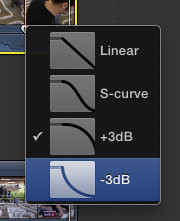
You know the itty-bitty little drag handles that are the correct way of doing audio crossfades (rather than the hair-brained bastard transition nonsense Dza favours)? Right-click that.

Win. And yes, the constant-power +3dB fade is default, as is right and proper, but there are times when a long tail -3dB is called for.

I've never used a linear fade.

Tuesday, 29 January 2013

Remap your fucking keyboard


Dza discovers ⎇I / ⎇O to clear in/out points. Real editors remap their fucking keyboards so ⎇X is 'Clear Selected Ranges.'


Like it always was.

"Render-free", my arse

Yes, I am selectively fucking rendering my timeline. But it does have nine layers of mixed H.264 and AVCHD source in it. Animated. With effects. And grades. Deal with it.


Monday, 21 January 2013

VHS coffee table

What am I supposed to do with all this bloody VHS?

I guess I'd better glue it all together and make a coffee table.

I used to be proud of my wall of VHS. It was just a bunch of shelves, but it was big and high and full of VHS. It looked good, but I rarely watched any of it. It was just a folly. It was amusing, but not that amusing. Recently I decided I was being a dick and should throw it away. But I couldn't.

I couldn't throw it away, so I glued 128 tapes together to make a stylish coffee table. Sorry.

It's actually quite beautiful. And it's very amusing to look at. But it's bloody heavy. Like, really, really fucking heavy. It's a solid block of VHS and it's lovely.

I do have a soft spot for VHS. One of my most excited moments was getting hold of a pirate copy of The Empire Strikes Back at the age of 6. Wow. That beautiful hissing sound, it was like being by the sea. And the picture quality was just perfect. Like walking across the moors in fog. Bliss.

I took on a paper round and worked at a bike shop just so I could buy Aliens Special Edition and Robocop on VHS. My first VHS. What was my first DVD? I've no idea. After uni, my friends and I used to stay up all night discussing the virtues of big box video. We'd also trawl charity shops and Cash Converters to find lost horror classics not available on DVD. We also spent a lot of time using an analogue to digital converter so we could capture VHS and re-edit it into music videos and other nonsense. That was called Media Lounge and it was where I learnt to edit.

It's no wonder that my latest live performance video was shot on VHS. God bless VHS. Everyone has abandoned you, but I will never throw you away.

STOP PRESS: If you like that you'll love David Herbert's 2001, Lorenzo Durantini's 2216 VHS Tapes and Sean Cordeiro & Claire Healy's Lifespan.

Free FCPX Audio Cross Fade - Sound only transition

When you are making audio cuts you nearly always create a noticeable change in sound at the cut point.

In FCP7 the easiest way round this was to add a simple audio cross fade. You can't do this in FCPX. Why not? Why the fuck not? Because it's fucking stupid that's why.

But don't worry because Alex Gollner isn't stupid and he has created an audio only cross fade for FCPX. Not only that, it's free.

Download the audio only transition from Alex4D.

Thanks Alex. You help heal the pain and hurt of FCPX.

Sunday, 20 January 2013

Go to In / Out Point

Shift I and shift o will move the playhead to the in and out point respectively.

Another simple and life saving hint that they don't teach you at the royal academy of Shakespeare.